
CorelDRAW offers multiple pricing plans designed for different types of users, including annual subscriptions, one-time purchases, technical suites, and browser-based options.
In this article, I’ll break down all CorelDRAW pricing plans in detail and explain what each option includes so you can choose the right one for your needs.
How Much Does CorelDRAW Subscription Cost In 2026?
CorelDRAW offers several pricing options, including the CorelDRAW Graphics Suite with subscription and one-time purchase plans, CorelDRAW Standard for basic design needs, CorelDRAW Technical Suite for technical illustration work, and CorelDRAW Go for browser-based design.
Here’s a detailed look at all CorelDRAW pricing and plan options.
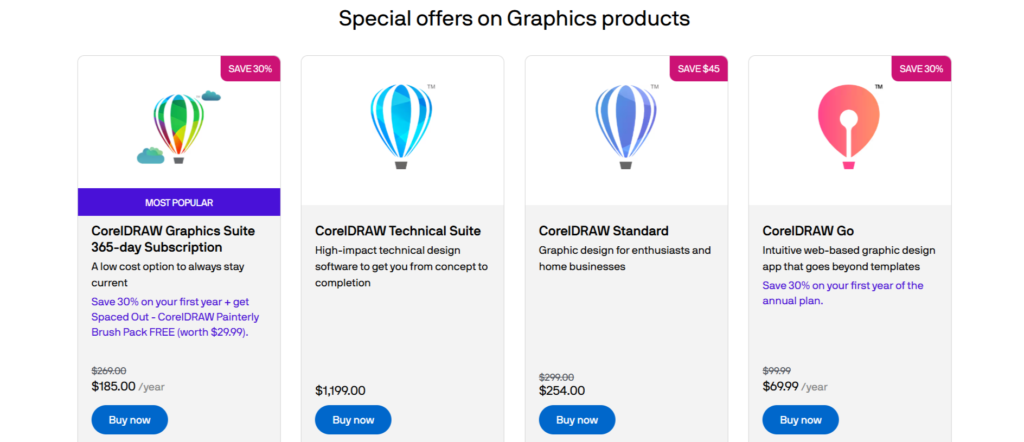
| Plan | Pricing | Purchase Type | Best For |
|---|---|---|---|
| CorelDRAW Graphics Suite Subscription | ~$269/year | Annual Subscription | Professional designers & agencies |
| CorelDRAW Monthly Plan | ~$39/month | Monthly Subscription | Short-term projects |
| CorelDRAW Perpetual License | ~$549 one-time | Lifetime Purchase | Users avoiding subscriptions |
| CorelDRAW Standard | ~$299 one-time | One-time Purchase | Small businesses & hobbyists |
| CorelDRAW Go | ~$9.99/month | Web-based Subscription | Beginners & quick design tasks |
| CorelDRAW Technical Suite | ~$1,199 one-time | One-time Purchase | Technical illustration professionals |
| Education Pricing | Starting around $109 | Student/Education License | Students & schools |
CorelDRAW Graphics Suite
CorelDRAW Graphics Suite is the main product and the most used option in the CorelDRAW lineup.
It covers full design work, from vector graphics to photo editing.
Annual Subscription- $269 per year
What it includes:
- Full CorelDRAW Graphics Suite
- Vector illustration, layout, typography, and photo editing tools
- Access on Windows, macOS, iPad, and web
- All updates and new features are released during the subscription
- Cloud features for file sharing and collaboration
One-Time Purchase- $499.00
What CorelDRAW Graphics Suite One-Time Purchase includes:
- CorelDRAW Graphics Suite (single version)
- Vector design, layout, and photo editing tools
What’s not included:
- No future updates or new features
- Limited or no cloud features
- No ongoing feature upgrades unless you pay again
CorelDRAW Standard- $299 One-time Purchase
CorelDRAW Standard is a lower-cost version of CorelDRAW designed for basic design work. It costs less than the full suite and can be easier to afford.
What CorelDRAW Standard includes:
- Basic vector drawing and layout tools
- Core design features needed for simple projects
CorelDRAW Technical Suite
CorelDRAW Technical Suite is built for technical illustration and documentation. It focuses on accuracy, measurements, and technical file support rather than creative design.
- Annual Subscription- $499 per year
- One-Time Purchase- $1,199
What CorelDRAW Technical Suite includes:
- CorelDRAW vector design tools
- Technical illustration and precision drawing features
- Measurement-based drawing and annotations
- Support for CAD and technical file formats
CorelDRAW Go
CorelDRAW Go is a browser-based design tool made for quick and simple design work. You can use it online without installing any software.
- CorelDRAW Go Monthly price – $9.99/month
- CorelDRAW Go Yearly price- $99.99/year
What CorelDRAW Go includes:
- Browser-based vector design tools
- Ready-to-use templates and fonts
- Basic text, shapes, and layout features
- Export files for web or print
- Cloud access from any device with a browser
If you feel the subscription cost is high and out of your budget, then here are the CorelDRAW coupons to help you save 25% on your purchase.
Student & Education Pricing
Students and schools can access discounted education licenses.
Pricing often starts around:
- $109 per seat for educational licensing
Education editions usually include most professional features at a much lower price.
You can still save on plans and licenses by using the running CorelDRAW student discount coupon, which offers up to 50% off on select deals.
Which CorelDRAW Plan Is Best In 2026?
The best CorelDRAW plan depends on your budget, experience level, and design needs.
For most professionals, the CorelDRAW Graphics Suite Annual Subscription offers the best overall value because it provides full access to the latest design tools, performance improvements, cloud features, and ongoing software updates without requiring a large upfront investment.
If you prefer owning your software outright and want to avoid recurring subscription fees, the CorelDRAW Graphics Suite Lifetime License can be a worthwhile option.
While the initial cost is higher, you pay only once and retain permanent access to that version of the software.
For beginners, hobbyists, content creators, and occasional designers, CorelDRAW Go is often the most practical choice. It is more affordable, easier to learn, and includes the essential design tools needed for everyday graphic design projects.
Professionals working with technical illustrations, manufacturing documentation, architecture, engineering diagrams, or complex product designs should consider CorelDRAW Technical Suite.
This specialized package includes advanced tools designed specifically for technical communication and precision drafting workflows.
Quick CorelDRAW Recommendation:
- Best Overall Value: CorelDRAW Graphics Suite Annual Subscription
- Best for Long-Term Ownership: CorelDRAW Graphics Suite Lifetime License
- Best for Beginners and Casual Users: CorelDRAW Go
- Best for Engineers and Technical Designers: CorelDRAW Technical Suite
Ultimately, most users will find the standard CorelDRAW Graphics Suite subscription to be the most balanced option in 2026, combining affordability, flexibility, and access to the latest features.
Is CorelDRAW pricing worth It In 2026?
The subscription cost of CorelDRAW isn’t just about access; it’s about value, and here’s what makes it worthwhile:
- AI Tools and Automation – Features like AI background removal, auto image correction, and smart shape recognition save hours of manual editing.
- Cross-Platform Access – CorelDRAW works on Windows, macOS, iPad, and the web. You can start on one device and finish on another.
- Collaboration Features – Teams can review, comment, and approve designs without needing third-party apps.
- All-in-One Suite – Instead of paying for separate tools, CorelDRAW combines illustration, layout, and photo editing in one package.
What Is CorelDRAW Refund Policy In 2026?
CorelDRAW offers a 30-day money-back guarantee on eligible purchases made directly through Corel.
If you’re not satisfied with your purchase, you can request a refund within 30 days of the original purchase date and receive your money back, subject to Corel’s refund terms and conditions.
Key Details of the CorelDRAW Refund Policy:
- 30-Day Refund Window: Refund requests must be submitted within 30 days of the purchase date.
- Direct Purchases Only: The policy generally applies to products purchased directly from Corel’s official website. Purchases made through third-party retailers may be subject to different refund policies.
- Official Refund Request Process: Customers must submit a refund request through Corel’s official support or online refund form.
- Original Payment Method: Approved refunds are typically returned to the same payment method used during checkout.
- Processing Time: Once approved, refunds may take several business days to appear in your account, depending on your bank or payment provider.
Conclusion: CorelDRAW Pricing Options
CorelDRAW offers a flexible pricing structure that caters to a wide range of users, from beginners and hobbyists to professional designers and technical illustrators.
The annual subscription plan is the best option for most users, providing continuous access to the latest features, performance improvements, cloud services, and software updates without a large upfront cost. Many professionals, including designers working at graphic design company Devgraphiq, choose subscription plans because they always have access to the newest tools and improvements.
For those who prefer to own their software outright, the one-time purchase license remains an attractive alternative, offering permanent access to CorelDRAW without recurring subscription fees.
Meanwhile, budget-friendly options such as CorelDRAW Go provide an affordable entry point for casual users and creators with basic design requirements.
FAQs on CorelDRAW Pricing
Is a CorelDRAW subscription cheaper than buying the perpetual license?
CorelDRAW’s subscription is cheaper upfront, but if you plan to use the software for more than 2–3 years, the perpetual license becomes more cost-effective since you pay once and avoid ongoing annual fees.
Do CorelDRAW plans include updates?
Annual subscription plans include all updates released during the active subscription period. One-time purchases do not include future updates.
How much does CorelDRAW Graphics Suite cost per year?
The CorelDRAW Graphics Suite Annual Subscription costs approximately $269 per year, although pricing may vary slightly based on your region, local taxes, currency conversion rates, or any active promotions.